
Xon setup guide: APK, PWA and device needs

According to catalogues, the Xon casino app opens the same account as the website — casino lobby, sportsbook and cashier — without typing an address each time, and Xon mobile access works the same way at home or on the move. There are two routes: an Android installation file (APK) downloaded from the operator's website, and a web app (PWA) that iPhone and iPad owners add to the home screen through Safari. This page is a practical setup guide for both, followed by the device requirements and the checks that keep an installation safe. Information comes from independent reviews and catalogues; where they disagree, both versions are given.
Installing anything is optional. The site is responsive and runs in any current mobile browser, so the app is a matter of convenience: an icon on the home screen instead of a typed address. The account, balance and limits are the same in all versions.
Xon Bet APK for Android
Android allows apps from outside the Play Store, provided the user grants permission. According to CasinoDaddy, the operator's app is available for Android only, and the download link sits in the footer of the operator's site under "Application". Some reviews mention a Google Play listing, but the sources disagree and the listing is not confirmed. The Xon Bet app file is about 30 MB.
Installation steps:
- Open the operator's website in the phone's browser and scroll to the footer to find the "Application" link.
- Download the APK file. Android may warn that files from the internet can be harmful — this is a standard system message for any download outside the Play Store.
- Allow the browser to install unknown apps: Settings → Apps → Special access → Install unknown apps (the exact path differs between manufacturers).
- Open the downloaded file from the notification bar or the Downloads folder and confirm the installation.
- Launch the app and log in, or open a new account directly in the app.
- Return to the settings and withdraw the permission to install unknown apps, so that no other file can be installed silently.
A few safety rules apply to every sideloaded app. The file should come only from the operator's own domain — never from forums, messaging groups, file-sharing sites or so-called mirror pages, where copies may be modified to capture login data. Google Play Protect can stay switched on; if it flags the file, the safest response is to cancel and use the browser version instead. How updates are delivered is not documented (no data); if the app stops working properly, the current file should be downloaded again from the same source.
If the installation fails, the usual causes are insufficient storage, an interrupted download or the unknown-sources permission not being granted. Deleting the incomplete file, freeing some space and downloading again over stable Wi-Fi solves most cases. For phones where installation is not an option — a work device with management restrictions, for example — the Xon mobile site in the browser opens the same account without any file.
Xon iOS PWA Setup
There is no confirmed native iPhone version of the Xon casino app. One Polish-language catalogue mentions an App Store listing for iOS 15.2 and later, while CasinoDaddy and SiGMA Play describe Android-only distribution. The reliable route on an iPhone or iPad is therefore the progressive web app (PWA): a home-screen shortcut that opens the site in its own window, without the address bar, and behaves much like an installed app.
Setup steps in Safari:
- Open the operator's website in Safari — the "Add to Home Screen" function for web apps is reliably available there, but not in every other browser.
- Tap the Share icon (a square with an upward arrow) in the bottom toolbar.
- Scroll down the menu and select "Add to Home Screen".
- Keep or edit the suggested name and tap "Add".
- Open the new icon on the home screen and log in with the account details.
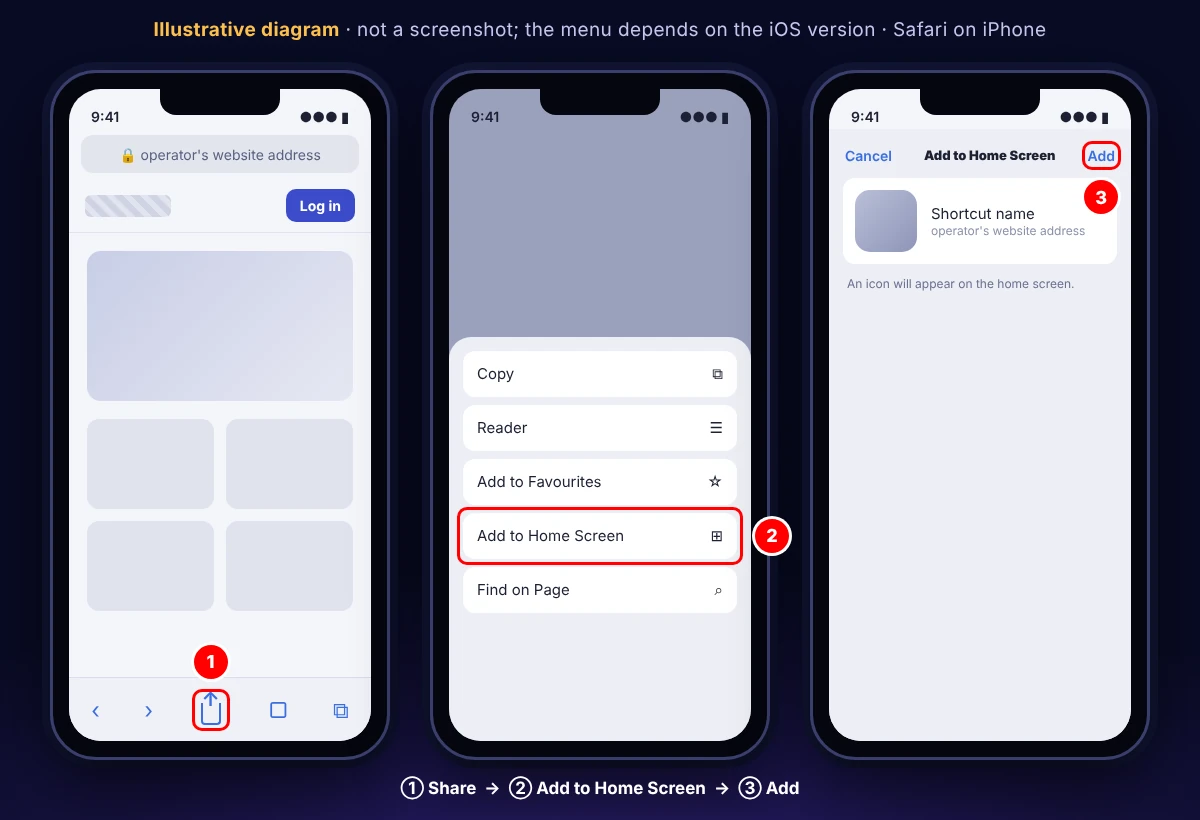
The web app needs no storage for a package and updates itself whenever the website changes, so there is nothing to download again. It uses the same encrypted connection as the site in Safari. The limitation is the dependence on a network connection: without mobile data or Wi-Fi the icon cannot load games, which applies to any form of online play anyway. Push notifications and similar system features depend on the iOS version and on what the operator enables; the sources give no data on them.
For iPhone users, the PWA is the equivalent of the Xon Bet app on Android. Logging out works the same way as in Safari, and removing the icon from the home screen deletes the shortcut without affecting the account.
Xon Hardware Requirements
The sources do not publish an official minimum specification, so the table below combines what reviewers report with general requirements of the formats involved.
| Item | Android (APK) | iPhone / iPad (PWA) | Mobile browser |
|---|---|---|---|
| System | current Android version recommended; exact minimum: no data | current iOS; one catalogue cites iOS 15.2+ | any current browser |
| Storage | about 30 MB for the file, plus cache | practically none | browser cache only |
| Installation | APK, unknown-sources permission | Safari → Add to Home Screen | none |
| Updates | no data | automatic | automatic |
| Connection | stable mobile data or Wi-Fi; live tables need more bandwidth | same | same |
| Cost | free | free | free |
In practice, the factor that limits play most is not the processor but the connection. Slots and crash games are generally less demanding, while live dealer tables stream video continuously; on a weak signal the picture freezes and a bet may miss the betting window. Wi-Fi or a strong 4G/5G signal is advisable for live play, and a data plan with enough allowance avoids unexpected charges, as a long live session can consume a noticeable amount of data.
Battery and heat are the other practical points. Long sessions with bright screens and video streams drain the battery quickly, so a power-saving mode or a charger nearby helps on longer trips. Older phones with little free storage, or devices that no longer receive system updates, are better served by the browser version, which always runs the latest code without installation.
According to catalogues, the phone opens the same account as a computer: the cashier with cards, e-wallets and cryptocurrencies, live chat and responsible gaming tools such as deposit, loss, stake and session limits, cool-off and self-exclusion. A separate list of mobile-only differences is not published (no data). A session time limit is especially useful on mobile, where short sessions add up easily. Bonuses are tied to the account, so the Xon mobile version receives the same offers as the desktop site — details are on the bonuses page, and sign-in steps are on the login page.
Xon App FAQ
Is the Xon casino app free?
According to the sources, yes: no fee is mentioned for the Android file or the iPhone web app.
Why is the Xon Bet app not installed from Google Play?
Sources disagree: some reviews mention Google Play, while others say the file is distributed only through the operator's website. Availability can vary by country and may change.
Is the iPhone web app safe?
It opens the operator's website in its own window, using the same encrypted connection as Safari. It should be added only from the operator's genuine domain.
How much space does the app need?
The Android file is about 30 MB plus cache. The iPhone web app installs no package and takes practically no space.
Does the phone version have fewer features?
According to catalogues, no: games, payments, support and responsible gaming tools are tied to the same account, and only the layout is adapted to the screen. A full feature comparison is not published (no data).
What should be done if the app stops logging in?
Download the latest version from the operator's site, or log in through the mobile browser, which always runs the current version.