
Xon on a phone: sign up, verify, log in

Xon Bet login on a smartphone follows the same rules as on a desktop, but the small screen, saved sessions and camera-based document upload change the details. This page walks through the whole path a mobile player takes: filling in the Xon Bet registration form in the app or mobile browser, confirming contact details, sending identity documents straight from the phone and getting back into the account when something goes wrong. The descriptions are based on independent reviews of the platform; the exact layout of the form may change with updates, and fields not described in any source are marked "no data".
The account itself is device-independent. Whatever is set up on the phone — currency, limits, bonus choice — appears unchanged on a tablet or computer, so the order of steps below matters more than the device used to complete them.
Xon Mobile Registration
Sign-up is available on the mobile site, in the Android app and in the iPhone web app added through Safari. The exact position of the button and the layout of the form are not described in the sources (no data), so the steps below describe a typical sign-up as reported by reviewers.
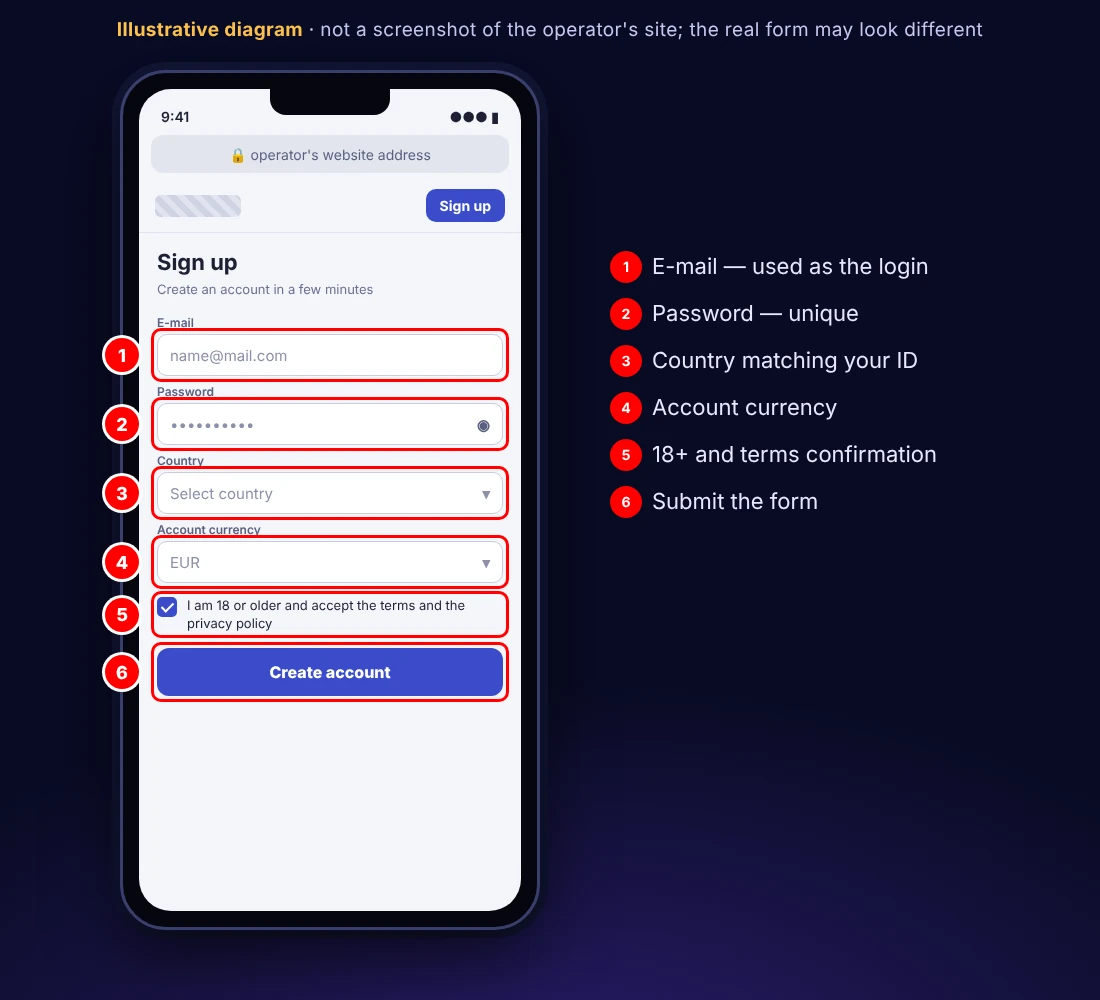
Step 1: Open the sign-up form
Tap the registration button on the operator's site or in the app downloaded from the operator's domain. A form opened from a link in an unknown message or a mirror page should be closed — only the operator's own domain is a safe starting point for entering personal data.
Step 2: Enter e-mail and password
The e-mail address is typically used for the Xon casino login as well, so it should be an inbox the player checks regularly; confirmation links and password resets arrive there. On a phone, a password manager or the system keychain can generate and store a long, unique password, which is safer than reusing one from another site.
Step 3: Choose country and currency
The country of residence must match the identity documents uploaded later. The account currency is worth choosing to match the card or e-wallet that will be used, because a mismatch adds conversion costs to every deposit; sources mention EUR and PLN, and the full list depends on the country.
Step 4: Accept the terms and decide on the bonus
The form contains confirmation of age (18+) and acceptance of the operator's terms. Whether the welcome package can be activated or declined at this point is not documented (no data). A promo code field, if shown, should only be filled with a code from a current operator campaign; codes found on third-party sites may be expired.
Step 5: Confirm e-mail and phone number
According to one review, the e-mail address and the phone number have to be confirmed after submission. On a phone, a confirmation link opens directly in the browser, which makes this step quick. The same review links this double confirmation to a free-spin offer; SiGMA Play and CasinoDaddy do not list that offer, so it should not be relied on.
Once these steps are done, the account is active and can be used for deposits and play. The same sign-up completed on a computer gives an identical result, and the player can switch devices at any time.
Xon KYC From Your Phone
Identity verification (KYC — Know Your Customer) is not part of Xon Bet registration, and it has no effect on Xon Bet login either. It is required before the first withdrawal and, according to independent reviews, most often for payouts above 2,000 EUR; SiGMA Play gives the threshold as 2,000 USD in total withdrawals. CasinoDaddy names NODA as the external KYC provider.
A phone camera is usually the fastest way to provide documents. A few practical points improve the chance of approval at the first attempt:
- photograph documents on a dark, flat surface in daylight, with all four corners visible;
- avoid flash reflections on laminated ID cards and passports;
- upload the original photo rather than a screenshot or an edited image;
- cover the middle digits of a bank card, leaving the first six and last four visible (a common practice; the operator's exact requirement: no data);
- check that the name and address in the account profile match the documents exactly.
| Document | Examples | What to watch |
|---|---|---|
| Identity | ID card, passport | valid, both sides of an ID card |
| Address | bank statement, utility bill | address matches the profile; required document age: no data |
| Payment method | card photo with digits partly covered, e-wallet screenshot | owner's name matches the account |
On Trustpilot, some players report documents being rejected several times, which delays payouts. Keeping copies of everything sent and noting the date of each upload makes it easier to follow up with support. Verifying soon after sign-up, before any withdrawal request exists, means the first payout does not have to wait for the document check. How verification affects payout times is explained on the withdrawals page.
Xon Account Access
The Xon casino login uses the credentials chosen during sign-up: typically the e-mail address and the password set in step 2. The position of the login button is not documented (no data). The same credentials work in the mobile browser, the Android app and the iPhone web app.
Mobile sessions behave differently from desktop ones. The Android app and the home-screen web app may keep the session after the window is closed (the exact behaviour is not documented — no data), so the account can stay logged in. On a personal phone protected by a screen lock this is convenient; on a shared or borrowed device it is a risk, and logging out manually after each session is the safer habit. Browser autofill can store the password, but only on a device that nobody else uses.
After logging in, the account panel typically shows the balance and responsible gaming settings; according to the sources, that is where deposit, loss, stake and session limits are set, as well as cool-off breaks and self-exclusion from 24 hours to about two months; longer periods are arranged through support. Setting a session limit on a phone is particularly useful, because mobile play tends to happen in short, frequent sessions that add up.
Common access problems and their usual fixes:
- Wrong password or e-mail. Check for typos and for capital letters added automatically by the phone keyboard, then use the password reset function or ask support for help.
- No confirmation e-mail after Xon Bet registration. Look in spam and promotions folders; if nothing arrives, support can be asked to resend the link.
- Login fails in the app but works in the browser. An outdated Android app version may be the cause; downloading the current file from the operator's site can help. Installation details are on the app page.
- The site does not open. Access to gambling domains can be restricted by internet providers in some countries, and a domain may become unavailable at any time. This is usually a legal restriction rather than a technical fault.
- Account locked after self-exclusion. During the exclusion period access to play is restricted by design.
Support is available 24/7 via live chat (mainly in English, starting with a bot before a human agent joins, according to SiGMA Play) or by e-mail at [email protected] (CasinoDaddy). A request should include the account e-mail and a description of the error — never the password. Repeated failed Xon Bet login attempts should be resolved with a password reset rather than further guessing.
Xon Login FAQ
Is the mobile sign-up different from the desktop one?
According to reviews, no. The fields and steps are the same; only the layout is adapted to the screen. An account opened on a phone works on every other device.
Which details are needed to log in?
Typically the e-mail address given at sign-up and the password. Logging in with a phone number is not described in the sources (no data).
Can documents be uploaded from the phone?
According to reviews, yes, through the account panel; the exact menu location is not documented (no data). Clear photos of the original documents, taken in good light, are usually processed fastest.
When is verification required?
Before the first withdrawal and most often for payouts above 2,000 EUR, according to reviews (SiGMA Play: after 2,000 USD in total withdrawals). It can also be requested at other times under the operator's terms.
Why does the app keep the account logged in?
The Android app and the iPhone web app may store the session for convenience. On a shared phone, logging out after every session prevents others from accessing the account.
Does Xon casino login work the same in the app and the browser?
Yes. The same e-mail and password open the account in the Android app, the iPhone web app and any mobile or desktop browser.